Website-Barrierefreiheit 2025: WCAG AA und die Anforderungen für barrierefreie Websites
Ab Juni 2025 müssen alle Websites in Deutschland den WCAG 2.1 AA Standard erfüllen, um den Anforderungen der digitalen Barrierefreiheit gerecht zu werden. Dies betrifft sowohl öffentliche Einrichtungen als auch private Unternehmen, die sicherstellen müssen, dass ihre Websites für alle Nutzer zugänglich sind. Insbesondere das Barrierefreiheitsstärkungsgesetz (BFSG) schreibt vor, dass Websites, die öffentliche Dienstleistungen anbieten, barrierefrei gestaltet werden müssen.
Update: Eine neue Version der Richtlinie WCAG 2.2 AAwurde Veröffentlicht.
Die WCAG 2.1 (Web Content Accessibility Guidelines) bieten detaillierte Richtlinien zur Erstellung barrierefreier Websites, die Menschen mit Behinderungen den gleichen Zugang zu digitalen Inhalten ermöglichen. Unternehmen, die eine WCAG-Konformität anstreben, müssen sicherstellen, dass ihre Webanwendungen und Inhalte gemäß diesen internationalen Standards gestaltet sind.
Für Webentwickler und Designer ist es wichtig, Tools wie Webflow zu verwenden, die es erleichtern, barrierefreie Websites zu erstellen. Durch die Implementierung von WCAG AA-Standards können Websites besser auf die Bedürfnisse von Menschen mit Einschränkungen eingehen, sei es durch verbesserte Textdarstellung, alternative Navigation oder durch Integration von Hilfsmitteln.
Wichtige Maßnahmen zur Umsetzung der WCAG-Konformität umfassen unter anderem die Optimierung der Website-Navigation, die Bereitstellung von alternativen Texten für Bilder und die Verbesserung der Tastaturbedienbarkeit. Besonders in Bezug auf das Barrierefreiheitsstärkungsgesetz müssen Unternehmen sicherstellen, dass ihre Websites bis zum Stichtag vollständig WCAG-konform sind, um rechtlichen Konsequenzen vorzubeugen.
Durch die Barrierefreiheit einer Website wird nicht nur die Benutzererfahrung für Menschen mit Behinderungen verbessert, sondern auch die Reichweite der Website insgesamt erweitert. Es ist wichtig, dass Unternehmen in die digitale Barrierefreiheit investieren, um eine inklusive digitale Welt zu schaffen und gleichzeitig den rechtlichen Anforderungen gerecht zu werden.
Was schreibt das Gesetz vor?
Das Barrierefreiheitsstärkungsgesetz (BFSG) hat das Ziel, digitale Angebote für alle Menschen zugänglich zu machen – insbesondere für Menschen mit Behinderungen. Ab Juni 2025 müssen Unternehmen sicherstellen, dass ihre Websites und digitalen Anwendungen mindestens den Anforderungen der WCAG-Konformitätsstufe AA entsprechen.
Was umfasst die WCAG 2.2 AA?
Die WCAG (Version 2.1) definiert klare Richtlinien zur Barrierefreiheit. Die Konformitätsstufe AA enthält insgesamt 62 Kriterien, darunter:
Perceivable Inhalte: Inhalte müssen wahrnehmbar sein, z. B. durch ausreichenden Farbkontrast und Textalternativen für Bilder.
Operable Navigation: Alle Funktionen müssen per Tastatur bedienbar sein.
Understandable Inhalte: Klare Sprache und vorhersehbare Navigation sind Pflicht.
Robuste Technik: Inhalte müssen mit Hilfstechnologien wie Screenreadern kompatibel sein.
Wer muss WCAG 2.2 AA einhalten?
✅ Öffentliche Stellen (z. B. Behörden, Kommunen, Hochschulen) → Schon jetzt verpflichtend durch BITV 2.0 ✅ Unternehmen, die digitale Produkte & Dienstleistungen anbieten, darunter:
Online-Shops
Banken & Finanzdienstleister
Telekommunikationsanbieter
Software & Apps
E-Book-Plattformen
Streaming-Dienste
🚨 Ausnahmen: ❌ Kleinstunternehmen (weniger als 10 Mitarbeiter & Jahresumsatz unter 2 Mio. €) sind ausgenommen. Siehe Website des Bundesministerium des Innern ❌ Private Websites & Blogs ohne kommerzielle Absicht sind nicht verpflichtet. ❌ Dienstleistungen, die ausschließlich im Bereich B2B (Business to Business) angeboten werden. Siehe Website Bundesfachstelle Barrierefreiheit
Eine staatliche Marktüberwachung wird ab 2025 prüfen, ob Unternehmen diese Anforderungen erfüllen. Bei Nichteinhaltung drohen Strafen oder Einschränkungen der Marktteilnahme, insbesondere für öffentliche Angebote oder stark regulierte Branchen wie Banken, Versicherungen oder Online-Händler.
Herausforderungen bei der Implementierung von Barrierefreiheit
Komplexe Anforderungen der WCAG 2.2 AA
Viele Unternehmen haben Schwierigkeiten, alle Kriterien der Web Content Accessibility Guidelines (WCAG) 2.1 auf Konformitätsstufe AA zu erfüllen.
Besonders interaktive Elemente (Formulare, Navigation, Multimedia) erfordern technische Anpassungen.
Technische Umsetzung für verschiedene Geräte und Nutzergruppen
Barrierefreiheit bedeutet nicht nur Screenreader-Unterstützung, sondern auch Farbkontraste, Tastaturbedienbarkeit und alternative Navigationsmethoden.
Websites müssen für verschiedene Endgeräte optimiert sein, um z. B. auch seh- oder motorisch eingeschränkten Nutzern eine problemlose Nutzung zu ermöglichen.
Manueller Aufwand und Nachbesserungen
Nachträgliche Anpassungen an einer bestehenden Website sind oft aufwendiger als eine barrierefreie Umsetzung von Anfang an.
Viele Unternehmen setzen sich erst mit dem Thema auseinander, wenn es gesetzlich vorgeschrieben wird – dann fehlt oft das Know-how und die Zeit.
Warum ist Webflow ein ideales Tool für barrierefreie Websites?
Die Umsetzung von Barrierefreiheit kann technisch anspruchsvoll sein – hier kommt Webflow ins Spiel. Webflow bietet leistungsstarke Funktionen zur Unterstützung von Barrierefreiheit.
Vorteile von Webflow für Barrierefreiheit
Sauberer HTML-Code Webflow generiert semantischen Code, der die Grundlage für barrierefreie Websites bildet. So können Screenreader und andere Hilfsmittel die Inhalte leicht interpretieren.
Unterstützung von ARIA-Rollen Mit Webflow können Sie ARIA-Rollen und -Attribute (Accessible Rich Internet Applications) hinzufügen. Diese ermöglichen Screenreader-Nutzern eine bessere Navigation und sorgen dafür, dass Buttons, Menüs oder Slider korrekt erkannt werden.
Eingebaute Design-Flexibilität Mit Webflow lassen sich responsive Designs erstellen, die auf allen Geräten zugänglich sind – von Desktop-Computern bis hin zu Smartphones.
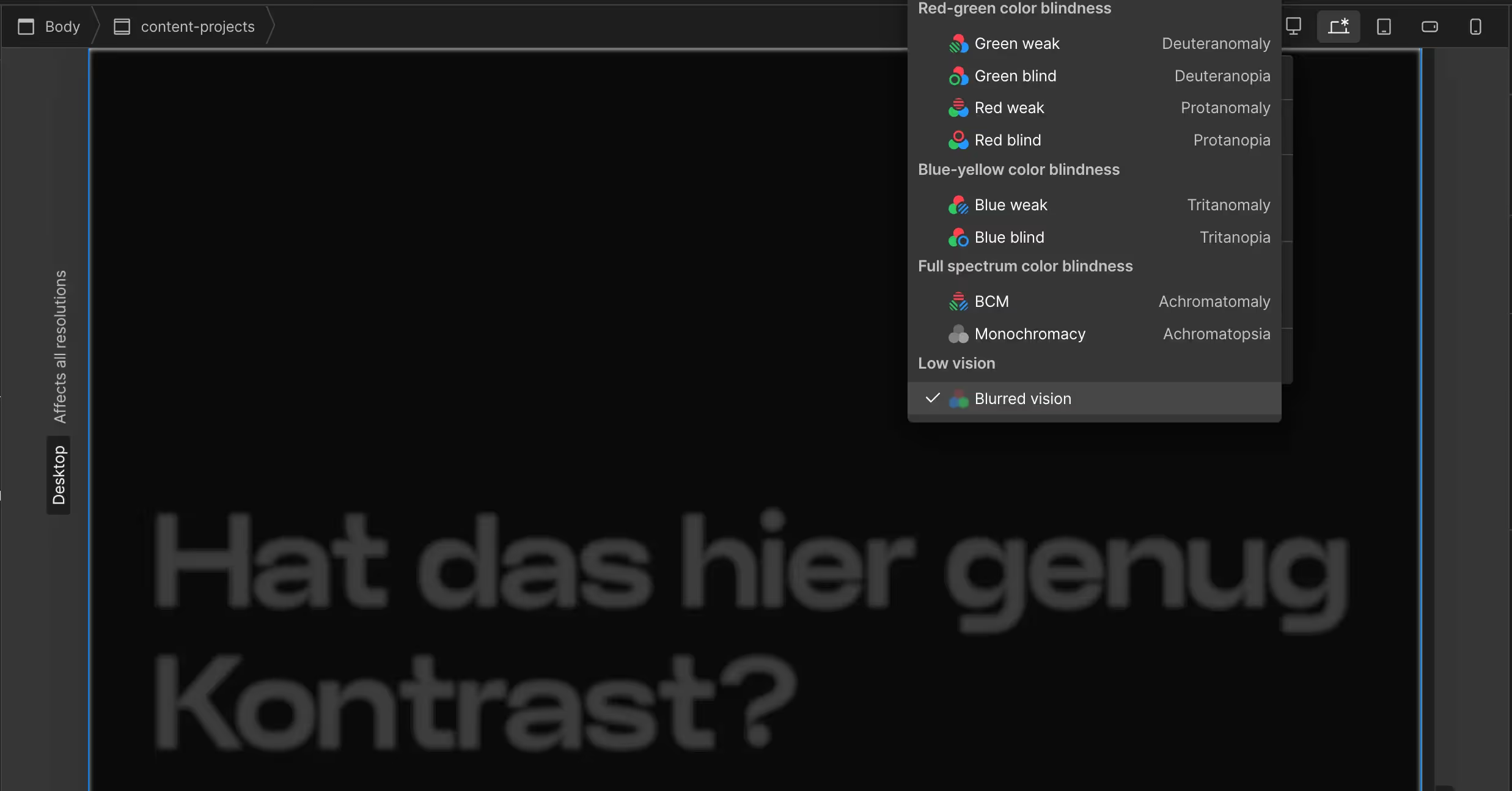
Farbkontraste und Typografie Webflow bietet Tools zur Anpassung von Farbkontrasten und Schriftgrößen. Beispielsweise können Sie mit Live-Vorschauen sicherstellen, dass der Text auch für Menschen mit eingeschränktem Sehvermögen gut lesbar ist.
Formulare und Interaktionen Formulare können so gestaltet werden, dass sie leicht zugänglich und verständlich sind – z. B. durch klare Beschriftungen (Labels) und visuelles Feedback für Fehler.
Beispiel: Farbkontraste in Webflow optimieren
Öffnen Sie die Design-Ansicht in Webflow.
Wählen Sie das zu bearbeitende Element (z. B. Text) aus.
Nutzen Sie den integrierten Color Picker, der automatisch die Kontrastverhältnisse überprüft.
Falls die Farbwahl nicht den Anforderungen entspricht, schlägt das Tool sofort Anpassungen vor.
Alternativen zu Webflow: Welche Tools können ebenfalls helfen?
Obwohl Webflow ein großartiges Tool ist, gibt es weitere Plattformen, die Unternehmen bei der Umsetzung barrierefreier Websites unterstützen können. Hier ein Überblick:
1. WordPress mit Barrierefreiheits-Plugins
WordPress ist ein weit verbreitetes CMS (Content Management System), das durch Plugins wie WP Accessibility oder Accessibility Checker Barrierefreiheitsfunktionen hinzufügt. Dies ist ideal für Unternehmen, die mehr Flexibilität oder komplexe Anpassungen benötigen.
2. Squarespace
Squarespace bietet ebenfalls benutzerfreundliche Design-Tools, jedoch mit weniger Flexibilität in Bezug auf ARIA-Attribute und spezifische Anpassungen. Es eignet sich eher für kleine Unternehmen.
3. Wix Accessibility Wizard
Wix bietet einen integrierten Barrierefreiheits-Assistenten, der gängige Probleme automatisch erkennt und Lösungsvorschläge macht. Dies ist besonders nützlich für Nicht-Techniker.
Tools zur Überprüfung der Barrierefreiheit
Um sicherzustellen, dass Ihre Website den Anforderungen entspricht, sollten Sie regelmäßig Tests durchführen. Hier sind einige hilfreiche Tools:
Ab dem Jahr 2025 wird Barrierefreiheit nicht nur ein gesellschaftliches Anliegen sein, sondern auch eine gesetzliche Pflicht für Unternehmen in Deutschland. Die Einhaltung der WCAG-Konformitätsstufe AA ist dabei der Mindeststandard, den es zu erfüllen gilt.
Mit Tools wie Webflow lassen sich barrierefreie Websites effizient und gesetzeskonform erstellen. Alternativ bieten auch Plattformen wie WordPress oder Wix hilfreiche Funktionen zur Unterstützung an. Nutzen Sie auch die vorgestellten Test-Tools, um sicherzustellen, dass Ihre digitale Präsenz wirklich für alle zugänglich ist - denn Barrierefreiheit bedeutet nicht nur Compliance, sondern auch mehr Reichweite und Nutzerzufriedenheit!
Was bedeutet WCAG AA Konformität?
Warum ist Barrierefreiheit 2025 besonders relevant?
Welche Elemente einer Website sind besonders wichtig für WCAG AA?
Muss ich meine bestehende Website komplett neu aufbauen?
Wie kann ich prüfen, ob meine Website WCAG-konform ist?
NEU: Ki Monitoring
Wie sichtbar ist dein Unternehmen in ChatGPT & Co.?